ID123 JSON API V2 Introduction
Introduction
ID123 is a digital ID card application and management system for schools, businesses, membership organizations, and other institutions. Card data can be uploaded via CSV or using an API. Card data can also be added to ID123 from a third party system through a Sync integration or LDAP connection. This document explains how to use an API to upload and manage card data.
Institutions can add, edit, and delete data from the ID Management System (IDMS) programmatically by integrating ID123 APIs. They can also send notifications to App users. The current published APIs will enable institutions to:
- Create Card (Creates a card with an “inactive” card status)
- Update Card (Update card information)
- View Card (Retrieve card information and status)
- Card Action (Update a card status based on action specified)
- Delete Card (Delete a card data record from your account)
- Send Push Notifications (Send push notifications to app users)
- Invite Card User (Send an invitation to user provided email based on card id and template Id)
- List Templates (List limited template information based on API Key)
- View Template (List detailed template information for the provided template ID)
- List Cards (List limited card information based on API Key and Template Id)
API Authentication
Authentication is the process of verifying the identity of a requester to ensure that they are who claim to be. Once the identity is confirmed, the system grants access to the requester for the resources for which a request has been made.
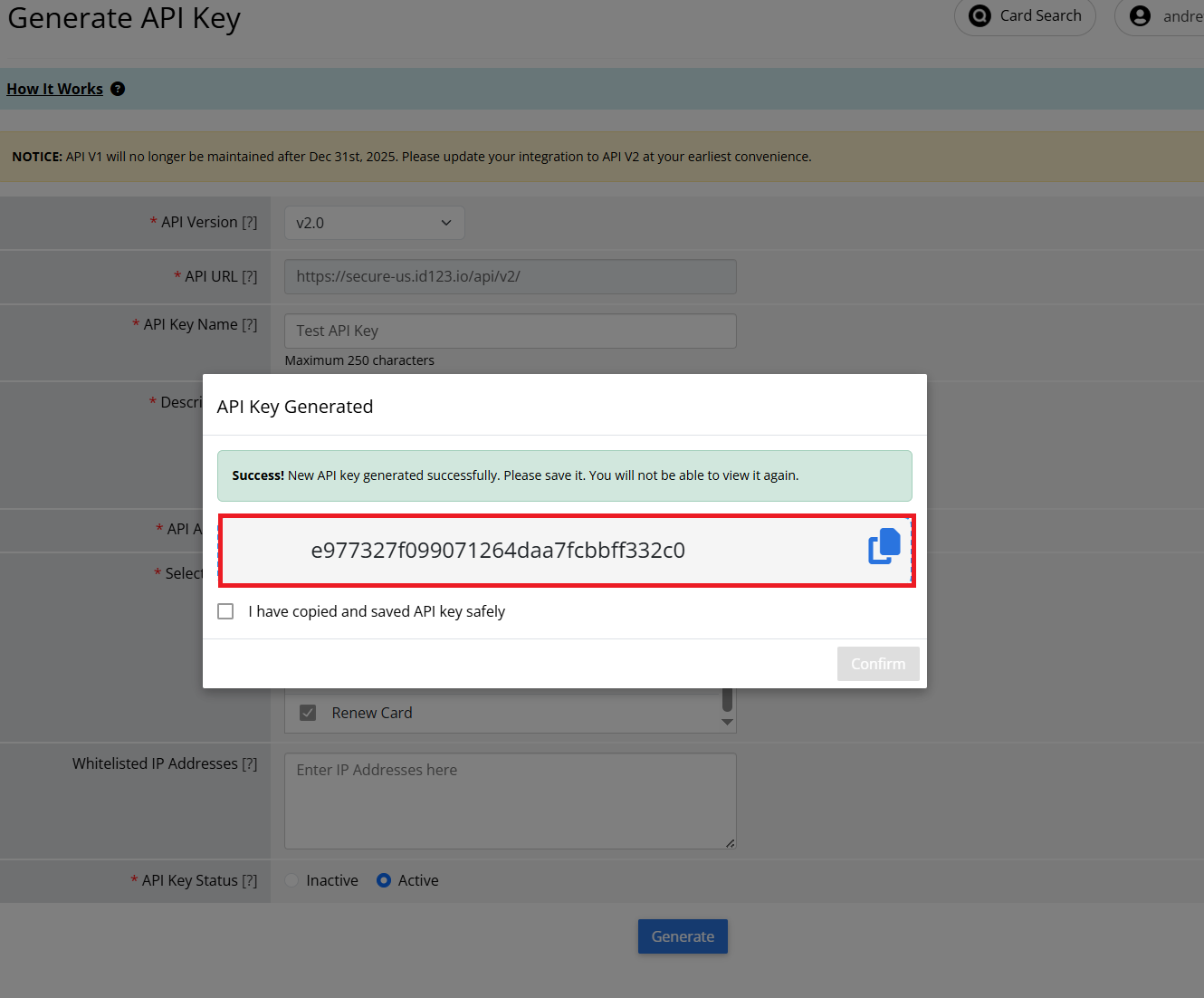
ID123 APIs use private key authentication to authenticate all requests. You can generate your private API Key in your account if you are on a paid plan that supports it.
X-API-KEY Header: To authenticate API calls with the API key, set an HTTP header variable X-API-KEY with API_KEY as value.
Where to find an API Key: https://app.id123.io/platform/account/api-settings.php
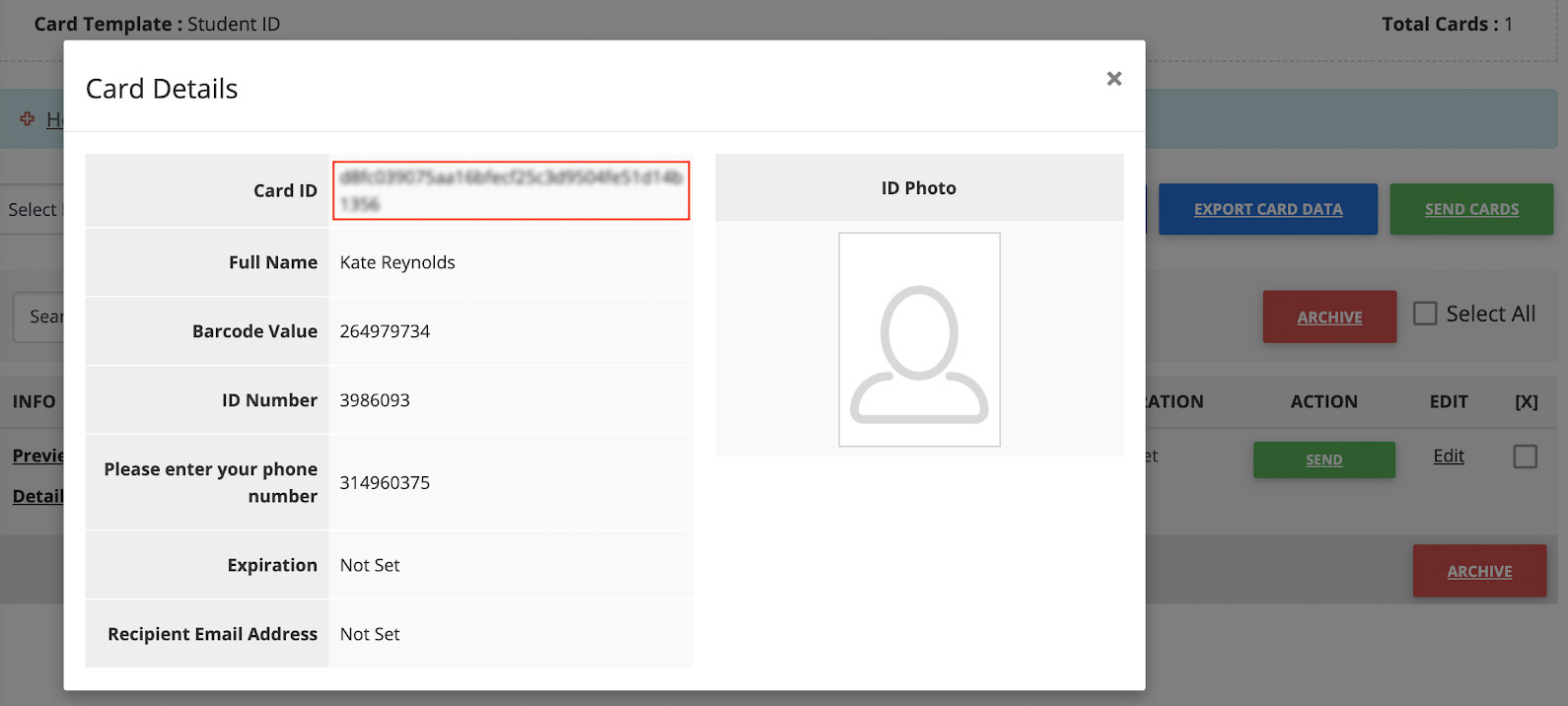
Where to find a Card ID: https://app.id123.io/platform/wallet/card-view-data.php or you can get a list of Card IDs using the List Cards.
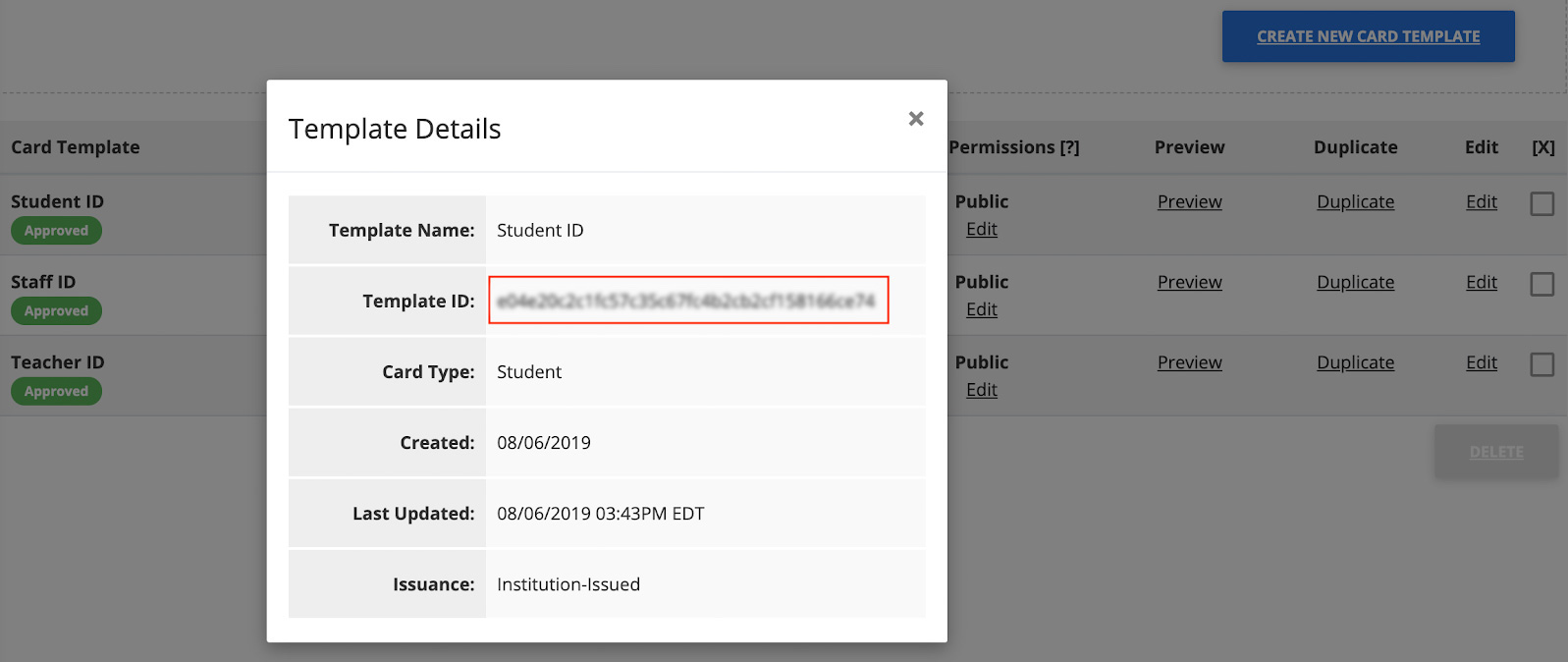
Where to find a Card Template ID: https://app.id123.io/platform/wallet/card-templates.php. You can also get a list of Card Template IDs using the List Templates API.
Revision History and Notes
Jan 1, 2021 – v2 released.
Definitions
| Term | Definition |
|---|---|
| Card | Any mention of “Card” refers to a digital ID card created for an ID123 app. Each Card issued to a person requires at least a “Name” value and a “Card ID” value. Optional values include barcode, expiration date, signature, and any cardholder data. |
| Card Data | Any mention of “Card Data” refers to the data displayed on the digital ID card. |
| Card Template | Any mention of “Card Template” refers to a template that is created for a certain card type and contains generic card data applicable to all cards. |
| Card ID | Any mention of “Card ID” refers to a unique ID used to identify each card in the system. This is not displayed on the card. |
| ID Management System or IDMS | Any mention of “ID Management System” or “IDMS” refers to the cloud-based platform offered by ID123 and used by institutions to create, issue, and manage mobile ID cards remotely. |
| API | Any mention of “API” refers to the web service interface used to send data from your server to ID123 servers in order to automate an action, add data or change data in a card or card template. |
| Institution | Any mention of “Institution” refers to any school, university, business or membership organization using the ID Management System. |
| Admin | Any mention of “Admin” refers to the person(s) administering the institution’s account in the ID Management System. |
| App User | Any mention of “App User” refers to the end user of the ID123 mobile app. |
| Card Builder | Any mention of “Card Builder” refers to the online tool in the ID Management System used by Admins to design and customize digital ID cards. |
| Unique Identifier | Any mention of “Unique Identifier” refers to a unique identifier of the cardholder (required) used to verify and authenticate user identity before creating a card. Values can be either email address or ID number. This won’t be displayed on the card. |
| Security Question 1 | Any mention of “Security question 1” refers to a security question used to verify app user identity before creating a card (required). Institutions can use any data they would like as security questions (e.g. date of birth, phone number). This won’t be displayed on the card. |
| Security Question 2 | Any mention of “Security question 2” refers to the second security question used to verify app user identity before creating a card (optional). |
| Barcode Value | Any mention of “Barcode Value” refers to the value displayed inside and below the barcode. |
| Card Template ID | Any mention of “Card Template ID” refers to a unique identifier for each card template (required). |
| Card Expiration | Any mention of “Card Expiration” refers to the date and time when the card should expire. It should be in yyyy-mm-ddThh:mm:ss+00:00 (UTC) format to support a timestamp based on a timezone. |
| Card Invitation Email | Any mention of “Card Invitation Email” refers to an email sent to cardholders as part of the card issuance process. Each email contains a link to install a unique digital ID card. |
| Front Field | Any mention of “Front Field” refers to a card field located on the first page of the digital ID card. Each front field (except for “Name”) has a field label and a field value. Name value is required to create a card. |
| Secondary Field | Any mention of “Secondary Field” refers to a card field located on the second page of the digital ID card. Each secondary field has a field label and a field value. Secondary fields are optional. |
| Back Field | Any mention of “Back Field” refers to a card field located on the third page or back of the digital ID card. Each back field has a field label and a field value. Back fields are optional. |
API Endpoints & Request/Response Formats
| Region | Domain | API Endpoint |
|---|---|---|
| United States | secure-us.id123.io |
https://secure-us.id123.io/api/v2/ |
| Australia/Oceania | secure-au.id123.io |
https://secure-au.id123.io/api/v2/ |
| Canada | secure-ca.id123.io |
https://secure-ca.id123.io/api/v2/ |
| Latin America | secure-la.id123.io |
https://secure-la.id123.io/api/v2/ |
| Africa | secure-af.id123.io |
https://secure-af.id123.io/api/v2/ |
| Europe | secure-eu.id123.io |
https://secure-eu.id123.io/api/v2/ |
| United Kingdom | secure-uk.id123.io |
https://secure-uk.id123.io/api/v2/ |
| Asia | secure-as.id123.io |
https://secure-as.id123.io/api/v2/ |
| Middle East | secure-me.id123.io |
https://secure-me.id123.io/api/v2/ |
| India | secure-in.id123.io |
https://secure-in.id123.io/api/v2/ |
Status Codes
Common API Errors
| Status Code | Status Message |
|---|---|
| F100 | Invalid request. Send a valid raw JSON via Post |
| F103 | You have exceeded the throughput on your plan |
| F105 | JSON Parse error |
| F109 | Missing or invalid ACTION key-value pair |
| F111 | API key not provided |
| F112 | Invalid API key |
| F113 | Cannot perform this action for the requested card |
| F110 | This API key is not compatible with the selected API version. Please ensure you are using a compatible API key. |
| F115 | Account is not accessible. |
| F116 | Invalid API key. Please verify and try again. |
| F117 | Inactive API key. Please activate and try again. |
| F1023 | The API key does not have permission to perform the action ‘ACTION’. Please enable the ‘ACTION’ API in your API key. |
| E105 | This account has no API rights. |
| E112 | IP was not whitelisted. API call rejected. |
Public API Errors
| Status Code | Status Message |
|---|---|
| F201 | FIELD_NAME is required |
| F202 | Card ID already exists |
| F203 | Card template was not found |
| F204 | Invalid value for FIELD_NAME field |
| F205 | FIELD_NAME value exceeds limit |
| F209 | Card was not found |
| F210 | ID photo URL length should not exceed character limit |
| F214 | Unique Identifier already exists |
| F215 | Invalid FIELD_NAME format. Please provide date in yyyy-mm-dd or mm/dd/yyyy format |
| F216 | Invalid action. Allowed actions are ‘activate’, ‘deactivate’, ‘revoke’, and ‘archive’ |
| F217 | Missing or invalid barcode value |
| F221 | Something went wrong during card generation |
| F222 | Unable to complete the deletion process |
| F231 | Notification Message length cannot exceed 100 characters |
| F232 | Notification Full message length cannot exceed 450 characters |
| F241 | Failed to send card user invitation(s) |
| F242 | Recipient email is not associated with the card |
| F246 | The selected target template has a different issuance type than the source template. |
| F248 | A card with the same Unique Identifier or Card ID already exists in the target template. |
| F249 | The specified target template does not exist for this account. |
| F250 | Missing or invalid renewal details. Ensure either new-template-id or expiration-timestamp is provided. |
Public API Success
| Status Code | Status Message |
|---|---|
| S2001 | Card was generated successfully |
| S2002 | Card was updated successfully |
| S2003 | Card was deleted successfully |
| S2004 | Card was retrieved successfully |
| S2005 | Card status was updated successfully |
| S2006 | Notification(s) sent successfully |
| S2007 | Card templates were retrieved successfully. |
| S2008 | Card user invitation(s) sent successfully. |
| S2009 | Card template was retrieved successfully. |
| S2010 | Template cards were retrieved successfully. |
| S2011 | Card was renewed successfully. |
Card Status
| Card Status Code | Description |
|---|---|
INACTIVE |
A card has not been installed on the app user’s device yet. Once the card is added by the app user, the status will change to “Installed”. If you have already sent a card invitation email but the card remains “inactive”, try sending it again as a reminder. |
INSTALLED |
A card has been installed on the app user’s device. We have removed DEACTIVATED from status as installed can also be deactivated. Installed cards can be active or inactive. |
ARCHIVED |
A card has been archived and can no longer be used by the system. If the card was installed at the time of archiving, the card would be automatically revoked from the app user’s device. Cards can be restored from the archive at any time and will become “Inactive”. Only archived cards can be deleted. Once the card is deleted, data cannot be recovered. |
UNINSTALLED |
A card has been uninstalled from the app user’s device. App users can reinstall their card at any time unless the administrator deactivated or archived it. |
Card Sub Status
| Card Sub Status Code | Description |
|---|---|
INACTIVE |
A card is inactive. This would be the default sub-status for inactive cards. |
ACTIVE |
A card has been installed and activated on the device |
DEACTIVATED |
A card has been temporarily deactivated by the account administrator and is no longer displayed on the app user’s device. The card can be activated again only by the administrator. |
EXPIRED |
A card has expired. |
Issuance Type
| Issuance Type Code | Description |
|---|---|
SELF_ISSUED |
App users provision data in the app to self-issue ID cards for themselves. Self-Issued cards are fully controlled by users but can also be edited, deactivated, or revoked by institution administrators. |
INSTITUTION_ISSUED |
Institution administrators control the issuance of ID cards. Users are asked to verify their identity before generating their ID card in the app. |
Status Actions
| Actions | Description |
|---|---|
activate |
Activate action will activate the deactivated card and restore the archived card. |
deactivate |
Deactivate the card. |
revoke |
Revoke an installed card from the app user’s device. |
archive |
Archive the card. |